
Why bring a product to market for the small- to mid-sized live sound sector?
The live sound market is incredibly diverse across theatre, broadcast, live music and corporate AV. Engineers work across different industry sectors every day, and production companies supply a wide range of industries. An ecosystem that fits all these sectors and meets the expectations of engineers and suppliers is critical. We wanted to bring the DM7 Series workflow and user experience into a more compact format, without asking engineers to compromise on the tools they need to deliver the same result, and The DM5 Series is about making that level of capability accessible to a broader range of applications and budgets.
How similar is the DM5 Series to the previously released DM7 Series?
One of our key objectives was to retain the workflow that engineers are already familiar with from the DM7 Series, but also in turn some of our slightly older products. The DM5 Series isn’t simply a smaller console with a different operating philosophy; it brings the same core approach to channel processing, mixing, touchscreen operation and system integration into a more compact footprint. This means sound engineers moving between the DM7 and DM5 can benefit from a consistent way of working, rather than having to learn a completely different interface for different applications.
The consoles also share compatible files through DM Editor, which makes it easier to prepare sessions on one platform and transfer them between the two. There are differences in physical layout and available analogue I/O, particularly between the DM5 and DM5 Compact. But the underlying philosophy remains consistent: give engineers quick access to the parameters they need, keep the interface intuitive, and let them concentrate on the application rather than navigating the mixing console.
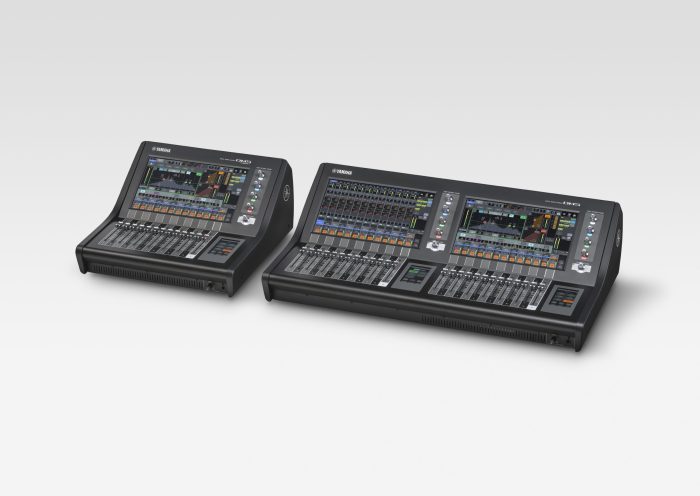
Why offer standard and compact versions?
We recognised that no single console format suits every engineer or every production. Sometimes you need a substantial control surface with plenty of physical faders; in other situations, the priority is keeping the footprint to a minimum. Importantly, the compact isn’t a stripped-back mixing engine, but ultimately, offering two formats gives engineers the freedom to choose the physical console that suits their work.
How will sound engineers benefit from the ‘glass keys’ feature?
The glass keys are one of the most interesting aspects of the DM5 interface because they combine the flexibility of a touchscreen with the tactile response engineers expect. Our glass keys can change their labels dynamically to reflect the current operating mode. The idea wasn’t simply to put more functions on a screen. It’s to give engineers more direct access to the functions they need without making the surface more complicated.
How can the ‘Yamaha Assist’ functions reduce setup tasks in a real-world environment?
For me, the value of Assist is that it recognises how much of a live engineer’s time can be spent on essential but repetitive preparation before the creative work really begins – but also, it can help a less experienced engineer get into the workflow faster.If you are a less experienced operator, rather than working through every channel entirely from scratch, the engineer can use these suggestions to establish a strong starting point.
We’re keen to stress that Assist is there to support the engineer, not replace their judgement. These functions provide recommendations that the operator can assess and adjust. The real benefit is reducing the time spent on repetitive tasks.
What other key features are you excited for engineers to start experimenting with?
First, the consoles have a strong processing capability, with four types of EQ, extensive dynamics options and 43 built-in effect types. Engineers can also add the optional PY-DSP card to access Yamaha Premium Rack plug-ins, including processing developed with Rupert Neve Designs. That gives users scope to shape their sound without immediately needing an external processing system.
Second, is connectivity with both consoles supporting up to 64 channels of Dante input and output at 96 kHz, which brings support for Yamaha R Series I/O racks but also a whole host of third party options. Third, the remote-control options – DM StageMix allows engineers to adjust the mix from different positions around the venue, while MonitorMix lets performers manage their own monitor mixes.
Finally, I would encourage engineers to explore the customisable controls and Dynamic Mode. Being able to tailor the controls to your own working style means the console can become a more personal, efficient instrument rather than a fixed interface that everyone must operate in the same way.
This story originally appeared in TPi Magazine #296.

